Gemini şunu dedi:
Sitenin otoritesini artıracak, hem teknik derinliği olan hem de arama motorlarının (SEO) sevdiği “JavaScript Performance Optimization” konulu bir blog post hazırladım. Bu konu, 2026 yılında Google’ın “Core Web Vitals” (Önemli Web Verileri) güncellemeleriyle daha da kritik hale geldi.
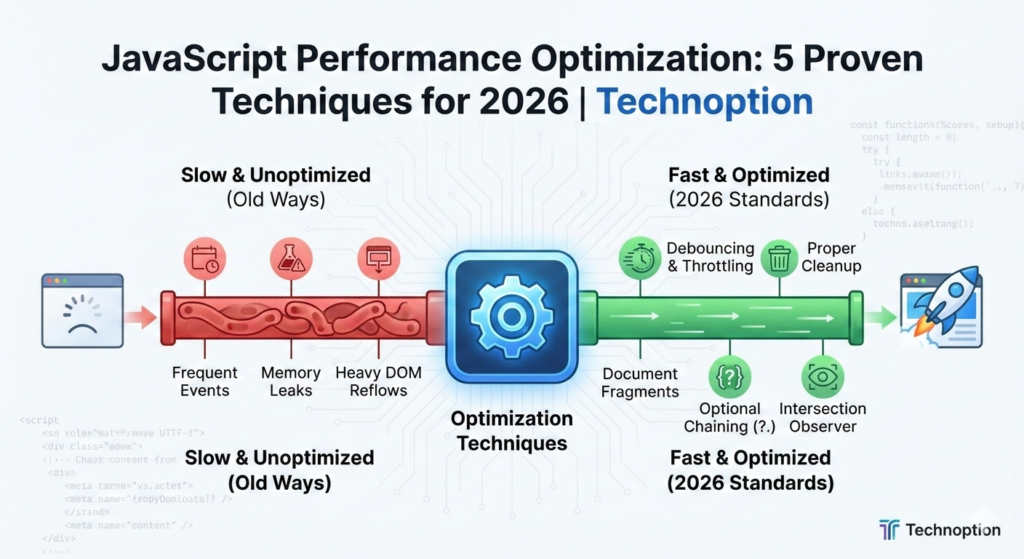
🚀 Mastering JavaScript Performance: 5 Proven Techniques for 2026
In the fast-paced world of web development, a single second of delay can cost you users and SEO rankings. As we navigate through 2026, JavaScript performance optimization is no longer a luxury—it’s a necessity.
In this guide, we’ll dive deep into modern techniques to make your JS code leaner, faster, and more efficient.
1. Stop Frequent Executions: Debouncing and Throttling
When users type in a search bar or resize a window, executing a function on every single event can crash your performance.
The Solution: Debouncing
Debouncing ensures that a function is only called after the user has stopped performing the action for a specific amount of time.
// A simple debounce implementation
function debounce(func, timeout = 300) {
  let timer;
  return (...args) => {
    clearTimeout(timer);
    timer = setTimeout(() => { func.apply(this, args); }, timeout);
  };
}

// Usage: Only triggers 300ms after the user stops typing
const saveInput = debounce(() => console.log('Data saved to API!'));2. Eliminate Memory Leaks with Proper Cleanup
Memory leaks are silent performance killers. In 2026, with complex Single Page Applications (SPAs), failing to remove event listeners is a common mistake.
The Fix: Removing Event Listeners
Always clean up your global events, especially when components unmount.
const scrollHandler = () => {
    console.log('Scrolling...');
};

// Adding the listener
window.addEventListener('scroll', scrollHandler);

// Crucial: Removing the listener when no longer needed
// In React, this would be in the useEffect cleanup function
window.removeEventListener('scroll', scrollHandler);3. Efficient DOM Manipulation: Use DocumentFragments
Touching the DOM is expensive. If you need to inject 1,000 list items, doing it one by one will cause 1,000 “reflows.”
The Performance Hack: DocumentFragment
This acts as a “virtual” container that isn’t part of the main DOM tree until you decide it is.
const list = document.querySelector('#user-list');
const fragment = document.createDocumentFragment();
const users = ['Alice', 'Bob', 'Charlie', 'David'];

users.forEach(user => {
    const li = document.createElement('li');
    li.textContent = user;
    fragment.appendChild(li); // No reflow yet!
});

list.appendChild(fragment); // Only ONE reflow occurs here.4. Leverage Modern Optional Chaining
Old-school if statements for checking nested object properties are bulky and slow to read. 2026’s standard is Optional Chaining (?.), which improves both code readability and execution safety.
const userData = {
    profile: {
        settings: { theme: 'dark' }
    }
};

// The Old Way
const theme = userData && userData.profile && userData.profile.settings ? userData.profile.settings.theme : 'default';

// The 2026 Way (Clean & Fast)
const modernTheme = userData?.profile?.settings?.theme ?? 'default';5. Use Intersection Observer for Lazy Loading
Why load heavy scripts or images that aren’t even visible on the screen? The Intersection Observer API allows you to execute code only when an element enters the viewport.
const observer = new IntersectionObserver((entries) => {
    entries.forEach(entry => {
        if (entry.isIntersecting) {
            console.log('Element is visible! Load heavy content now.');
            // Logic to load image or trigger animation
            observer.unobserve(entry.target);
        }
    });
});

observer.observe(document.querySelector('.heavy-footer-widget'));💡 Summary for Developers
To keep your Technoption projects running smoothly:
- Optimize events with Debounce/Throttle.
- Clean up listeners to prevent leaks.
- Batch DOM updates using Fragments.
- Write cleaner code with Optional Chaining.
- Load lazily with Intersection Observer.